In this blog post, we will dive into the basics of computer hardware, which refers to the physical components that make up a computer system. We’ll explore both internal and external hardware components, focusing on external hardware devices known as peripherals. Specifically, we’ll discuss input devices that are used to enter information into a computer for processing. Let’s explore some common examples of input devices:
INPUT DEVICES
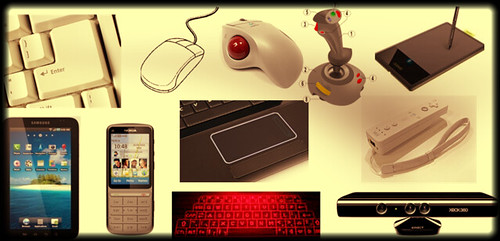
- Keyboard: The keyboard is one of the primary input devices for computers. It consists of a set of keys, including letters, numbers, symbols, and function keys, which allow users to input text and commands.
- Mouse: The mouse is a pointing device that enables users to move a cursor on the screen and select objects by clicking buttons. It enhances navigation and interaction with graphical user interfaces.
- Trackpad (or Touchpad): Commonly found on laptops, a trackpad is a touch-sensitive pad that allows users to control the cursor by moving their finger across its surface. It provides a similar functionality to a mouse.
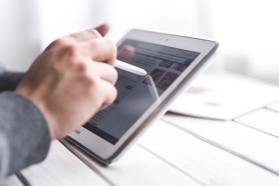
- Touchscreen: Touchscreens have become increasingly popular, especially in mobile devices such as smartphones and tablets. They enable direct interaction with the screen by touching and swiping gestures.
- Joystick: Joysticks are primarily used in gaming, providing precise control over movements in games that require analog input, such as flight simulators or racing games.
- Microphone: A microphone is an input device used to capture audio signals. It allows users to record sound or provide voice input to the computer, enabling voice recognition and communication applications.
- Light Pen: Although less common nowadays, a light pen is a pen-shaped device that can detect and interact with the screen’s light-emitting surface. It was historically used for drawing or selecting objects on CRT screens.
- Webcam: Webcams are video input devices used to capture live video or participate in video conferencing. They have become essential for remote communication and online collaboration.
- Speech Input: Speech input devices, such as microphones or specialized systems, enable users to input commands or interact with a computer through spoken words. This technology is used in voice assistants and dictation software.
These are just a few examples of external input devices that facilitate communication between users and computers. Understanding computer hardware, including input devices, is crucial for building a solid foundation in technology. In upcoming blog posts, we’ll explore other hardware components and their roles in computer systems.
OUTPUT DEVICES
we will explore the fundamentals of computer hardware, focusing on output devices. Output devices are hardware components that receive and present information from a computer to users in various forms. Let’s delve into some common examples of output devices:
- Monitor: A monitor, also known as a display screen, is one of the primary output devices for computers. It visually presents information, including text, images, videos, and graphical user interfaces (GUIs). Monitors come in various sizes and resolutions to provide visual output.
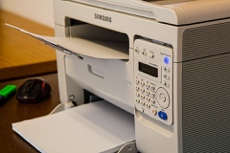
- Printer: Printers are devices that produce hard copies of digital information onto paper or other printable media. They are commonly used for printing documents, photos, and other materials.
- Scanner: Scanners are input-output devices that can capture images or text from physical documents and convert them into digital formats that can be stored or processed by a computer.
- Speaker: Speakers are audio output devices that produce sound or audio playback from a computer. They enable users to listen to music, watch videos, and engage in multimedia experiences.
- Display Screen (Tablet, Smartphone, etc.): Apart from traditional monitors, display screens on portable devices such as tablets and smartphones also act as output devices. They showcase visuals, including apps, games, videos, and web content, to users.
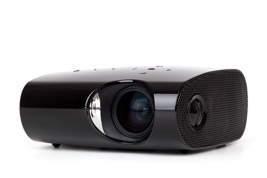
- Projector: Projectors display computer-generated visuals onto a larger surface, such as a screen or wall, enabling presentations, movie screenings, or immersive experiences in home theaters.
- Headphone/Headset: Headphones or headsets are audio output devices that deliver sound directly to the user’s ears. They provide a more private listening experience and are commonly used for music, gaming, and communication.
- Digital Signage: Digital signage refers to large display screens or monitors used for advertising, information dissemination, or interactive experiences in public spaces like airports, shopping malls, and stadiums.
These are just a few examples of output devices that allow users to receive and perceive information generated by a computer. Understanding the role and functionality of different hardware components is essential for comprehending how computers interact with the physical world.

INTERNAL HARDWARE
Internal hardware devices (or internal hardware components) – any piece of hardware device that is located inside the computer.
Examples: CPU, hard disk drive, ROM, RAM, etc.
Computer Software Basics
Computer software
Software – a set of instructions or programs that tells a computer what to do or how to perform a specific task (computer software runs on hardware).
Main types of software – systems software and application software.
Application software
Application software – a computer program that provides users with tools to accomplish a specific task.
Examples of application software: word processing, spreadsheets, presentation, database management, Internet browsers, email programs, media players, accounting, pronunciation, translation, desktop publishing, enterprise, etc.
System Software
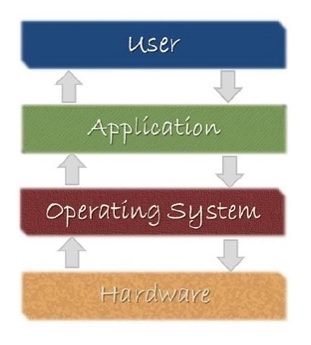
System software – it is designed to run a computer’s hardware and application software, and make the computer system available for use. It serves as the interface between hardware, application software, and the user.
Main functions of system software – allocating system resources, managing storage space, storing and retrieval of files, providing security, etc.
Main types of systems software – operating system, device driver, utility software, programming software, etc.
Operating system (OS) – a software that controls and coordinates the computer hardware devices and runs other software and applications on a computer. It is the main part of system software and a computer will not function without it.
Main functions of an operating system – booting the computer, managing system resources (CPU, memory, storage devices, printer, etc.), managing files, handling input and output, executing and providing services for application software, etc.
Examples of operating system: Microsoft Windows, Apple iOS, Android OS, macOS, Linux, etc.
Device driver – a software program that is designed to control a particular hardware device that is attached to a computer.
The main purpose of device driver – it acts as a translator between the hardware device and operating systems or applications that use it.
It instructs computer on how to communicate with the device by translating the operating system’s instructions into a language that a device can understand in order to perform the necessary task.
Examples of device driver: printer driver, display driver, USB driver, sound card driver, motherboard driver, ROM driver, etc.
Utility software – a type of system software that helps set up, analyze, configure, strengthen, maintain a computer and performs a very specific task (e.g. antivirus software, backup software, memory tester, screen saver, etc.).
 Fortizo Tech-hub
Leave a comment