
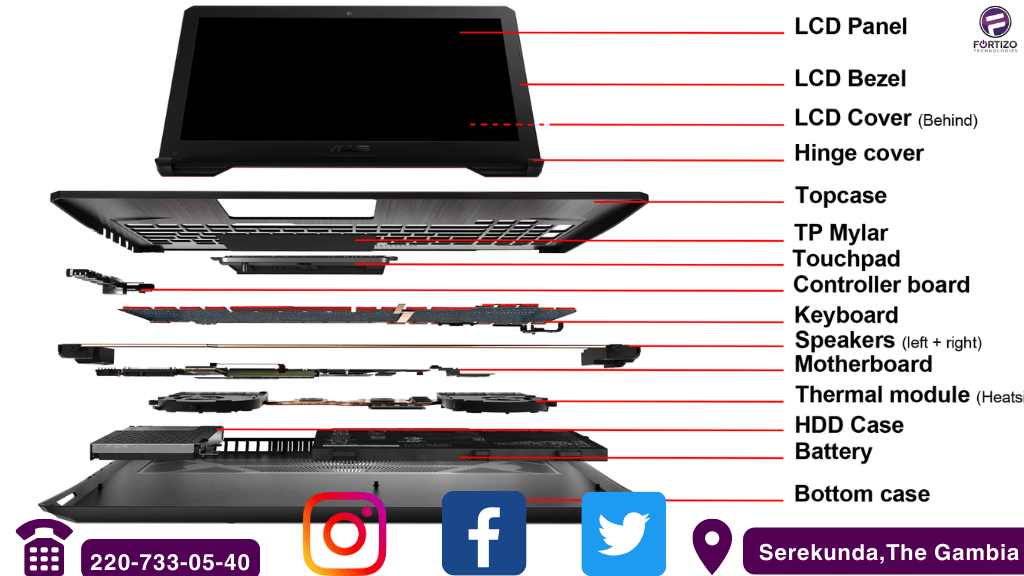
Ever peered inside your laptop and felt like you’d stumbled into a sci-fi movie set? Don’t worry, brave explorer, that’s completely normal! Today, we’re ditching the jargon and embarking on a friendly trek through the fascinating forest of laptop components. Get ready to understand what makes your digital companion tick, and maybe even impress your friends with your newfound tech knowledge!
Imagine your laptop as a high-tech city:
- The Motherboard: This is the bustling central hub, connecting all the vital districts (components) and ensuring smooth traffic flow (data transfer). Think of it as the city’s main avenue, bustling with information.
- The CPU (Central Processing Unit): This is the city’s mayor, making lightning-fast decisions and delegating tasks to keep everything running smoothly. Think of it as the brain of your laptop, crunching numbers and processing information at breakneck speed.
- The RAM (Random Access Memory): This is the city’s short-term memory, storing information currently being used by the CPU. Think of it as your desk where you keep open files and tools you’re actively working on.
- The Storage Drive (HDD or SSD): This is the city’s library and archive, storing all your documents, photos, and programs. Think of it as a giant warehouse holding all your digital belongings.
- The Display: This is the city’s window to the world, showing you everything that’s happening. Think of it as your eyes, displaying stunning visuals and information.
- The Keyboard and Mouse: These are your communication channels with the city, allowing you to send instructions and navigate its streets. Think of them as your voice and hands, interacting with the digital world.
Bonus components worth knowing:
- The Graphics Card: This is the city’s artist, rendering images and videos for an immersive visual experience. Think of it as a dedicated painter, creating the graphics you see on screen.
- The Battery: This is the city’s power plant, keeping everything running without needing constant connection to the grid. Think of it as your trusty backpack, holding the juice that fuels your laptop’s adventures.
Remember, this is just a beginner’s map: Each component has its own intricacies and functionalities, waiting to be explored. But with this basic understanding, you’ll navigate the digital jungle with confidence, knowing exactly who’s who and what’s what in your trusty laptop!
So, grab your curiosity compass and embark on your tech expedition! You might be surprised at how much fun understanding your laptop’s inner workings can be!
Don’t forget to share your discoveries and questions with the hashtag #LaptopComponents! Let’s build a community of tech explorers and unlock the secrets of our digital companions together!
Stay tuned for more:
Email: fortizotechnologies1@gmail.com,
Facebook: https://www.facebook.com/fortizoverse
Instagram: https://www.instagram.com/fortizotechnologies1/
Twitter: https://twitter.com/FortizoTechnol1
 Fortizo Tech-hub
Leave a comment